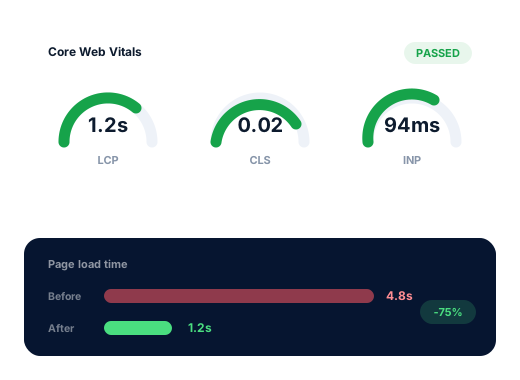
Largest Contentful Paint (LCP)
LoadingThe moment the largest visible element, often a hero photo or headline, has fully appeared. Aim for 2.5 seconds or less. Heavy images and a server that is slow to reply are the usual suspects.

Speed Optimization
Faster pages for Richmond business sites, measured the way your customers really load them: on phones, often on mobile data, in a hurry between a train and a meeting.

Open your website at the office and it probably feels quick: fast wifi, a recent computer, and a browser that already remembers most of the page. Your customers rarely meet it that way. They open it for the first time on a phone, on mobile data, while walking from a Canada Line station, waiting at a gate at YVR or standing in a food court deciding where to eat. On those visits the same page can take several times as long.
That first visit on a phone is the one that counts. People who wait too long tap back to the results and try the next business, and Google’s ranking systems draw on speed figures gathered from real Chrome visits. Lighter pages help on both fronts.
Richmond adds its own pressure. Many searches here are tied to the clock, such as “open now” or “open late”, and many visitors are weighing several businesses at once. When three restaurants look equally appealing, the page that shows its menu and hours first has an edge.
Search demand
General Google searches; Richmond has no suggestions about site speed itself. Owners usually start from the symptom and pick up the jargon later.
Not every page needs equal attention. On Richmond sites the visits that matter most are often the hurried ones: a menu checked at 10 p.m., hours looked up before a drive across the bridge, a booking form opened between meetings. We find those pages in your analytics and fix them first. And we aim for a pass in Google’s real-visitor data rather than a perfect lab score, because the extra points seldom bring an extra call.
Common culprits
Most slow sites suffer from two or three of these together.
A single photo straight off a modern phone can run to several megabytes, then be shown in a space a few hundred pixels wide. Resizing it to fit and saving it in a modern format such as WebP strips out most of that weight.
Common on restaurant and café sites. A phone must download the whole file before anything is readable, and Google cannot read text trapped inside an image. A plain HTML menu is lighter and easier to find.
Drag-and-drop builders pull a large bundle of code onto every page, whether or not that page needs it.
Pop-ups, chat, social feeds, several analytics tags and an embedded map each add requests, and many were installed once and never reviewed again.
If the server takes a second or more to start responding, nothing later in the page can recover that time. Caching helps, but sometimes the host itself is the ceiling.
What Google measures
Google gathers these from real Chrome users across a rolling 28 days. A page passes when at least three quarters of those visits meet the target on all three.
The moment the largest visible element, often a hero photo or headline, has fully appeared. Aim for 2.5 seconds or less. Heavy images and a server that is slow to reply are the usual suspects.
The lag between a tap and the page visibly reacting. Aim for 200 milliseconds or less. Chat widgets, carousels and heaps of tracking tags tend to stretch it out.
How much the layout jumps around during loading, which is why people hit the wrong link. Keep it under 0.1 by reserving space for images, banners and anything that turns up late.
The work
Field and lab results for your key pages recorded before any change, so improvements can be shown rather than asserted.
Each image resized to the dimensions it is displayed at, compressed, served as WebP where supported, and loaded only as the visitor scrolls toward it.
PDF and image-only menus, price lists and timetables rebuilt as light HTML, so they load quickly and search engines can read them.
Plugins nobody uses taken out, extras such as chat and tracking loaded only after the main content, and fonts hosted alongside your site rather than fetched from elsewhere.
Page and browser caching configured to suit your server, so returning visitors wait even less.
Lab tests repeated as soon as the changes go live, and real-visitor data reviewed a month later, once Google has collected a fresh 28 days.
Done carefully
Rules we keep for every client, written down so you can hold us to them.
A fast page cannot rescue thin content, and a Richmond business does not need a perfect score to rank.
Speed is one ranking signal among many; its most reliable payoff is that fewer visitors give up before they reach you. Once your site is quick enough, we will say so and suggest where your money would do more, such as new service pages or your Google listing. Speed work is a one-time job, quoted after an audit.
Ask us about your business
How we work
Four steps that take a Richmond business from hard to find to first in line.
We review your website and Business Profile and check where you rank from several parts of Richmond.
We choose the searches worth winning and give each one a single, focused page.
Profile, site, content and listing improvements, starting with whatever will move results most.
A plain monthly report on calls, messages and rankings, and the plan for the month ahead.
Questions
Run your address through PageSpeed Insights and choose the mobile tab. Read the real-visitor section first; if it reports too little data, use the lab figures beneath as a rough guide. Then load the site on your own phone with wifi turned off.
The main content showing on a phone within 2.5 seconds, taps answered within 200 milliseconds, and nothing jumping about as the page loads.
It can help when you and a competitor are otherwise close. The more dependable gain is that more visitors stay long enough to call, book or come by.
Often, yes. A PDF menu is slow to open on a phone and hard to read without zooming, and its text does little for your rankings. Turning it into a simple web page usually fixes both.
For a small site, usually a week or two. Because Google averages field data over 28 days, the official pass appears about a month after the changes go live.
We quote it once, in Canadian dollars, after auditing the site, because the causes differ from one site to the next. Afterwards, keeping pages quick is part of the routine upkeep in our monthly plans at $300, $500 and $700.
Further reading
Further reading on this subject for Richmond business owners.
Each one stands alone, and most clients start with a single service.
Each industry here is searched differently, so each page has its own research.
Find out, free, how you rank from Steveston to City Centre, who is ahead of you and which changes matter most.
Request my free audit